Subnetting Practice: Examples, Questions & Answers
Practice subnetting with step-by-step examples, CIDR tables, VLSM exercises, subnet calculations, and learn common mistakes to avoid.

Subnetting is a fundamental networking skill. Engineers use it when planning IP addresses, dividing networks, configuring routing, creating VLANs, and determining whether devices belong to the same network.
The key is not memorising hundreds of possible answers. It is learning a small set of rules and applying them consistently.
This guide explains the core concepts, provides a simple method for solving subnetting problems, and includes practice questions with answers so you can test your understanding.
Subnetting can look complicated at first because it combines binary numbers, IP addresses, prefix lengths, subnet masks, and host calculations.
In practice, most IPv4 subnetting questions can be reduced to a few basic calculations.
The Concept
Given an address such as:
192.168.10.137/26
you may need to determine:
- The subnet mask
- The network address
- The broadcast address
- The first usable host
- The last usable host
- The number of usable hosts
- Which subnet contains the address
These are not separate concepts. They are different ways of describing the same block of IPv4 address space.
IPv4 addresses contain 32 bits, and CIDR notation describes how many of those bits belong to the network prefix. For example, /24 means that 24 bits identify the network and 8 bits remain for addresses within that block. RFC 4632 defines CIDR prefix notation and provides the standard relationship between prefix lengths and IPv4 block sizes.
The fastest way to improve is therefore simple: learn the pattern, solve problems repeatedly, and check your answers.
Key takeaways
- Subnetting divides an IP network into smaller networks.
- The prefix length determines how many bits belong to the network and how many remain for hosts.
- The formula for the total IPv4 addresses in a block is 2^(32 − prefix length).
- For a conventional IPv4 subnet, usable hosts are normally the total addresses minus the network and broadcast addresses.
- The block-size method is one of the easiest ways to find a subnet's network and broadcast address quickly.
- VLSM allows different subnet sizes to be used within the same address block.
- The best way to become fast at subnetting is repeated practice rather than memorising individual answers.
Subnetting basics
Before starting the exercises, it is important to understand the three pieces of information that appear in almost every subnetting problem.
IP address
An IPv4 address consists of four decimal octets, each representing 8 bits.
For example:
192.168.1.100
The complete address contains 32 bits.
Subnet mask
A subnet mask identifies which bits belong to the network and which belong to hosts.
For example:
255.255.255.0
in binary is:
11111111.11111111.11111111.00000000
The first 24 bits represent the network portion, which is why the same mask can be written as:
/24
Microsoft's networking documentation describes the subnet mask as the information used by TCP/IP to determine the network and host portions of an IPv4 address.
CIDR notation
CIDR notation expresses the prefix length directly after the address.
For example:
192.168.1.0/24
The /24 tells you that 24 of the 32 bits are part of the network prefix, leaving 8 host bits.
As the prefix number gets larger, the network becomes smaller.
For example:
| Prefix | Subnet mask | Total addresses | Usable hosts* |
|---|---|---|---|
| /24 | 255.255.255.0 | 256 | 254 |
| /25 | 255.255.255.128 | 128 | 126 |
| /26 | 255.255.255.192 | 64 | 62 |
| /27 | 255.255.255.224 | 32 | 30 |
| /28 | 255.255.255.240 | 16 | 14 |
| /29 | 255.255.255.248 | 8 | 6 |
| /30 | 255.255.255.252 | 4 | 2 |
These block sizes follow directly from the number of host bits left in the prefix. The IETF's IPv4 subnet table documents the corresponding CIDR ranges and address counts.
How to calculate subnet size
The first skill to master is calculating how many addresses a prefix provides.
The formula is:
Total addresses = 2^(32 − prefix length)
For a /26:
2^(32 − 26) = 2⁶ = 64 addresses
For a /27:
2⁵ = 32 addresses
For a /28:
2⁴ = 16 addresses
For conventional subnets, two addresses are normally not assigned to hosts: the network address and the broadcast address.
So:
Usable hosts = 2^(32 − prefix length) − 2
For /26:
64 − 2 = 62 usable hosts
Cisco's subnetting documentation uses the same relationship between host bits, total addresses, and usable host addresses when explaining IPv4 subnet calculations.
There are important exceptions. A /31 is defined for IPv4 point-to-point links and uses both addresses rather than reserving one as a traditional network and one as a broadcast address, while /32 identifies a single host route. RFC 3021 defines the /31 point-to-point use case, and RFC 4632 identifies /32 as a host route.
The easiest subnetting method: block size
One of the most useful subnetting shortcuts is the block-size method.
The block size is:
256 − the subnet-mask value in the relevant octet
For example, /26 has the mask:
255.255.255.192
The relevant octet is 192.
Therefore:
256 − 192 = 64
So the subnet boundaries occur every 64 addresses:
0, 64, 128, 192
This immediately tells you that the four /26 networks within a /24 are:
| Network | Usable range | Broadcast |
|---|---|---|
| 192.168.1.0/26 | 192.168.1.1–62 | 192.168.1.63 |
| 192.168.1.64/26 | 192.168.1.65–126 | 192.168.1.127 |
| 192.168.1.128/26 | 192.168.1.129–190 | 192.168.1.191 |
| 192.168.1.192/26 | 192.168.1.193–254 | 192.168.1.255 |
This method is much faster than converting every address into binary, especially once you recognise the common mask values.
Worked subnetting example
Let's calculate the subnet information for:
192.168.1.137/26
Step 1: Find the mask
A /26 corresponds to:
255.255.255.192
Step 2: Find the block size
256 − 192 = 64
Therefore, the subnet boundaries are:
0, 64, 128, 192
Step 3: Find the network
The address 137 falls between 128 and 191.
Therefore, the network address is:
192.168.1.128
Step 4: Find the broadcast
The next subnet begins at 192.
One address before that is 191.
Therefore:
Broadcast = 192.168.1.191
Step 5: Find the usable range
The first usable address is:
192.168.1.129
The last usable address is:
192.168.1.190
Final answer
192.168.1.137/26
- Network:
192.168.1.128 - First host:
192.168.1.129 - Last host:
192.168.1.190 - Broadcast:
192.168.1.191 - Usable hosts:
62
Cisco uses the same network-boundary approach in its subnetting examples: identify the relevant mask bits and determine the subnet containing the given address.
Subnetting practice: find the network and broadcast address
Now try these without looking at the answers.
Qustions
Question 1
192.168.10.45/27
Find:
- Network address
- Broadcast address
- First usable host
- Last usable host
Question 2
10.0.5.200/28
Find:
- Network address
- Broadcast address
- First usable host
- Last usable host
Question 3
172.16.33.78/20
Find the network address and broadcast address.
Answers
Question 1
/27 gives a block size of 32.
The boundaries are:
0, 32, 64, 96, 128, 160, 192, 224
The address .45 belongs to the 32–63 block.
Therefore:
- Network:
192.168.10.32 - First host:
192.168.10.33 - Last host:
192.168.10.62 - Broadcast:
192.168.10.63
Question 2
/28 gives a block size of 16.
The relevant boundaries include:
176, 192, 208, 224
The address .200 belongs to the 192–207 block.
Therefore:
- Network:
10.0.5.192 - First host:
10.0.5.193 - Last host:
10.0.5.206 - Broadcast:
10.0.5.207
Question 3
/20 means the third octet contains the relevant subnet boundary.
The mask is:
255.255.240.0
The block size is:
256 − 240 = 16
The third-octet boundaries are:
0, 16, 32, 48, 64...
The address 172.16.33.78 falls inside the 32–47 range.
Therefore:
- Network:
172.16.32.0 - Broadcast:
172.16.47.255
Subnetting practice: host requirements
Subnetting problems are not always presented as an IP address with a prefix. In network design, you are often given a number of required hosts and asked to choose the appropriate subnet.
Suppose a network needs to support 50 devices.
A /27 provides only:
30 usable hosts
so it is too small.
A /26 provides:
62 usable hosts
so /26 is the smallest conventional subnet that satisfies the requirement.
The same reasoning can be applied to any host requirement.
| Required hosts | Smallest conventional prefix | Usable hosts |
|---|---|---|
| 2 | /30 | 2 |
| 6 | /29 | 6 |
| 10 | /28 | 14 |
| 20 | /27 | 30 |
| 50 | /26 | 62 |
| 100 | /25 | 126 |
| 200 | /24 | 254 |
| 500 | /23 | 510 |
| 1,000 | /22 | 1,022 |
The important rule is to round up to the smallest address block that actually satisfies the requirement. Choosing a subnet that is too small creates an operational problem; choosing one that is much larger can waste address space.
VLSM subnetting practice
Real networks rarely need every subnet to be the same size.
One department might need 100 addresses, another 40, another 10, while a router-to-router link may only require two usable addresses.
This is where Variable Length Subnet Masking (VLSM) becomes useful. VLSM allows different prefixes to be allocated within the same larger address block.
Consider:
192.168.50.0/24
The network needs:
- Sales: 100 hosts
- Engineering: 50 hosts
- Support: 20 hosts
- Management: 10 hosts
- Router link: 2 hosts
The first step is to choose the smallest suitable subnet for each requirement.
| Requirement | Prefix | Usable hosts |
|---|---|---|
| Sales | /25 | 126 |
| Engineering | /26 | 62 |
| Support | /27 | 30 |
| Management | /28 | 14 |
| Router link | /29 | 2 |
Now allocate them from the beginning of the /24, starting with the largest requirement.
Sales: 192.168.50.0/25Range: .0–.127
Engineering: 192.168.50.128/26Range: .128–.191
Support: 192.168.50.192/27Range: .192–.223
Management: 192.168.50.224/28Range: .224–.239
Router link: 192.168.50.240/30Range: .240–.243
Addresses .244–.255 remain available for future requirements.
This is a practical example of why subnetting is a design skill rather than just an exam exercise. The engineer has to consider current requirements, efficient address allocation, and room for future changes.
Subnetting practice: VLSM exercise
Try designing the following network using:
10.10.0.0/24
Requirements:
| Network | Required hosts |
|---|---|
| Users | 90 |
| Servers | 40 |
| Voice | 20 |
| Management | 10 |
| WAN link | 2 |
Choose a prefix for each network and allocate the address space without overlaps.
Solution
Users require 90 hosts, so /25 is required.
Servers require 40 hosts, so /26 is required.
Voice requires 20 hosts, so /27 is required.
Management requires 10 hosts, so /28 is required.
The WAN link requires 2 hosts, so /30 is suitable for a conventional point-to-point subnet.
A valid allocation is:
| Network | Allocation | Usable range |
|---|---|---|
| Users | 10.10.0.0/25 | 10.10.0.1–126 |
| Servers | 10.10.0.128/26 | 10.10.0.129–190 |
| Voice | 10.10.0.192/27 | 10.10.0.193–222 |
| Management | 10.10.0.224/28 | 10.10.0.225–238 |
| WAN | 10.10.0.240/30 | 10.10.0.241–242 |
The remaining addresses can be retained for future expansion.
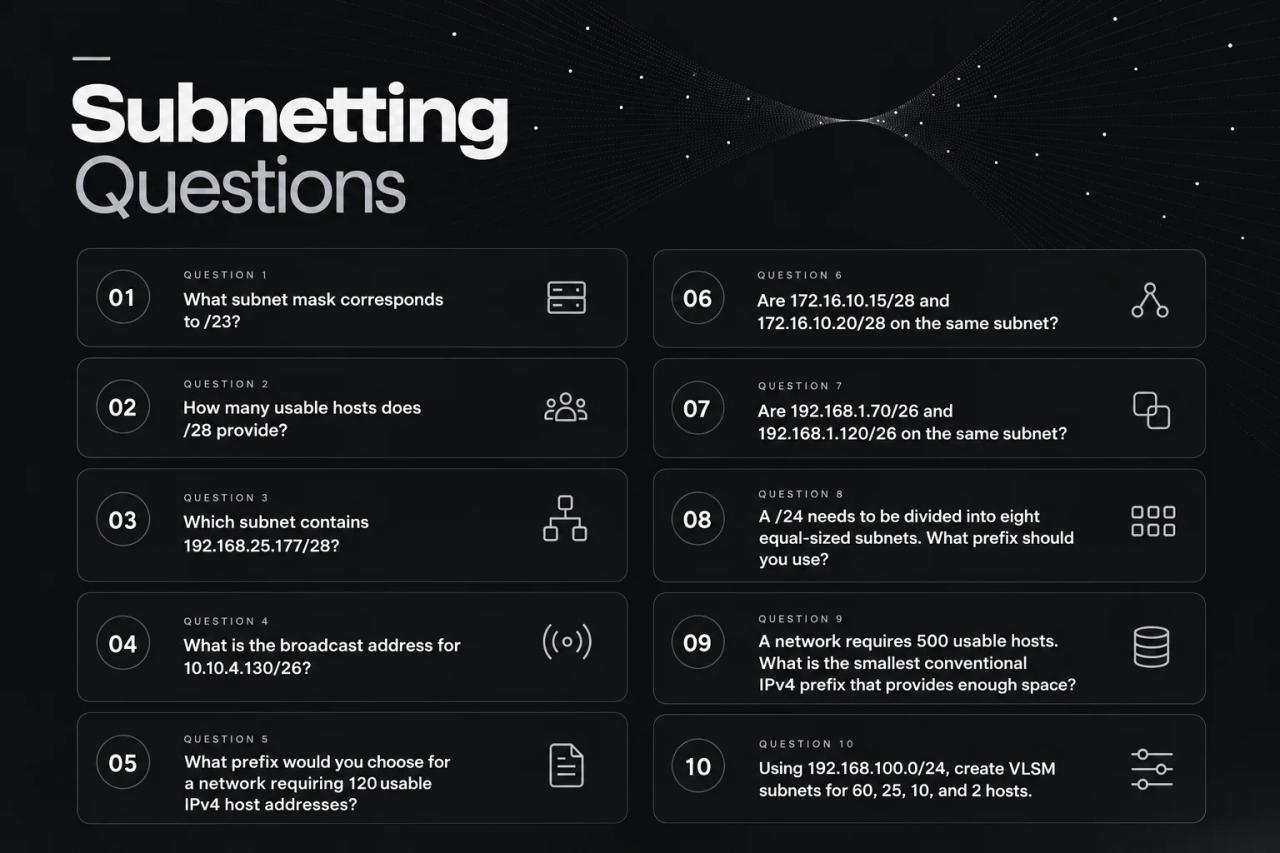
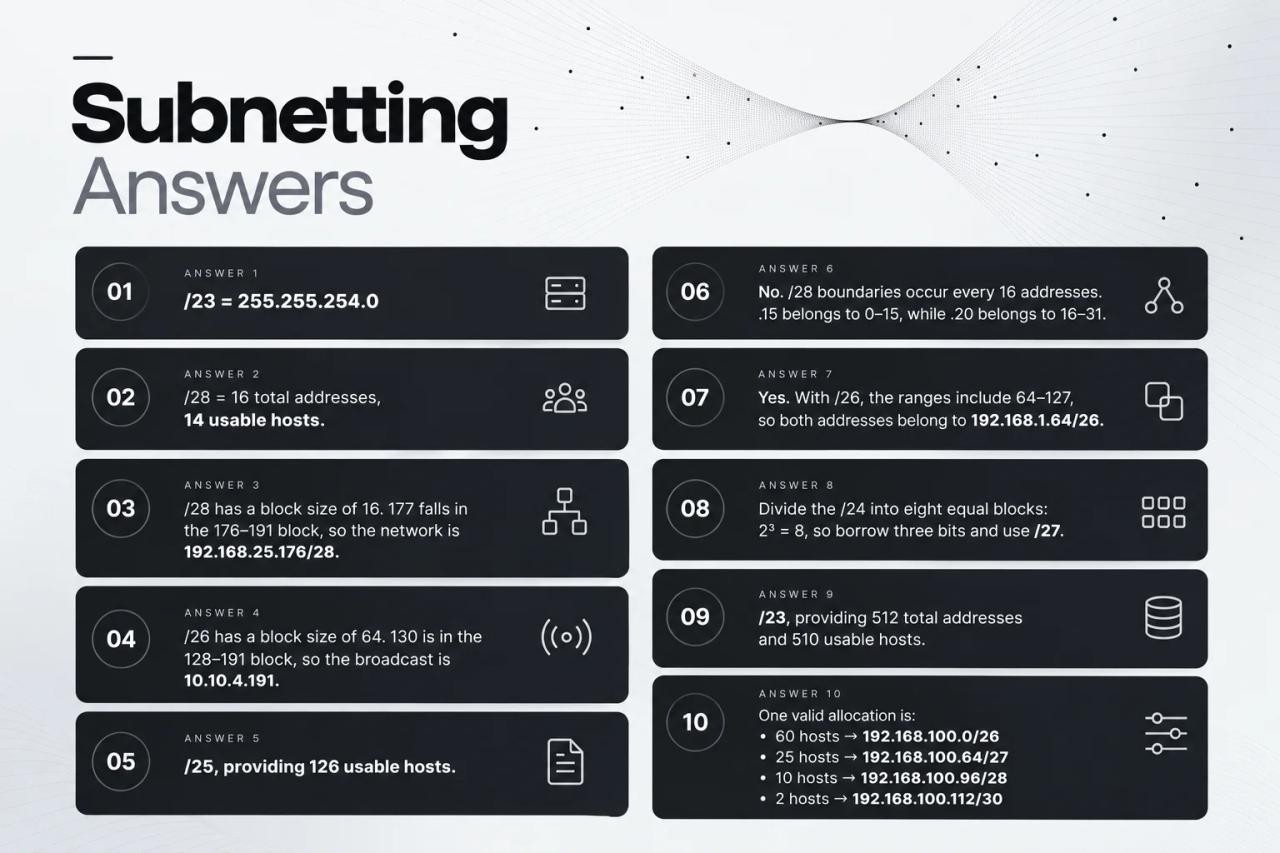
More subnetting practice questions
Once the basic calculations become comfortable, start mixing different question types. That prevents you from simply memorising one process.
Questions:
Answers:
Common subnetting mistakes
Subnetting errors usually come from a few predictable misunderstandings.
1. Confusing total addresses with usable hosts
A /27 contains 32 total addresses, not 32 usable host addresses. Under conventional IPv4 LAN addressing, the network and broadcast addresses reduce that to 30 usable hosts.
2. Using the wrong block size
For /27, the mask is 255.255.255.224, so the block size is:
256 − 224 = 32
It is therefore incorrect to count in increments of 27 or 224. The prefix length and mask value describe different things.
3. Forgetting which octet matters
For /20, the relevant mask value is in the third octet:
255.255.240.0
The subnet boundaries therefore occur every 16 in the third octet, not the fourth.
4. Choosing a subnet that is too small
If a network needs 50 hosts, /27 will not work because it provides only 30 usable hosts. Always calculate the capacity before assigning the prefix.
5. Treating subnetting as purely theoretical
Subnetting decisions appear in real network design. IP addressing plans, VLANs, routing boundaries, WAN links, security segmentation, and cloud networks all depend on correctly allocating address space.
How to get faster at subnetting
The goal of subnetting practice is not simply to get the answer right eventually. It is to recognise the pattern quickly enough that the calculation becomes almost automatic.
Start by learning the most common prefixes from /24 through /30, including their masks, block sizes, and usable host counts.
Then practise one question type at a time. First calculate subnet masks, then network addresses, then broadcasts, then host ranges. Once those become comfortable, combine them into complete problems.
Finally, introduce VLSM and mixed scenarios. These force you to think about the address space rather than relying on a single memorised pattern.
A useful practice routine is to solve each problem before checking the answer. When you make a mistake, identify exactly where the reasoning went wrong instead of simply memorising the correct result.
Subnetting improves through repetition because the underlying patterns become easier to recognise with each problem.
Subnetting practice in real network engineering
Subnetting is often introduced through classroom exercises and certification questions, but the same calculations appear in actual network projects.
An engineer may need to divide address space between departments, determine VLAN subnets, plan point-to-point links, allocate cloud networks, reserve space for future growth, or identify an overlapping subnet before configuration is deployed.
This makes subnetting closely connected to network planning.
A calculation that looks simple on paper can have wider consequences in a real environment. An incorrect prefix can cause address conflicts, unusable space, routing problems, or unexpected overlap between network segments.
That is why subnetting should be treated as part of a broader engineering workflow:
Requirements → Address plan → Subnets → Devices → Configuration → Validation → Documentation
The calculations are only one part of the process. Engineers also need to keep the resulting addressing plan connected to the devices and configurations that depend on it.
Practice Subnetting With Free Network Calculators
Understanding subnetting is essential, but having the right tools can make everyday network planning much faster. NetField provides a collection of free network calculators for subnetting, IPv4, IPv6, CIDR, and other common networking tasks.
Use the calculators to quickly check subnet sizes, calculate address ranges, find network and broadcast addresses, and validate your calculations while working on real network projects.
Whether you are practising for a networking certification or planning an actual network, the tools give you a quick way to check your work without manually calculating every value.
Try the free NetField network calculators and make everyday network calculations easier.
Subnetting practice checklist
When solving a subnetting problem, use the same process every time:
1. Identify the prefix.Determine how many network and host bits exist.
2. Find the subnet mask.Convert the prefix into dotted-decimal notation when necessary.
3. Calculate the block size.Use 256 − mask value in the relevant octet.
4. Find the subnet boundary.Determine which block contains the given IP address.
5. Find the broadcast.Use the address immediately before the next subnet.
6. Determine the usable range.Normally, start one address after the network and end one address before the broadcast.
7. Check your result.Make sure the address belongs inside the calculated range and that the prefix provides enough capacity.
The same process works across a wide range of IPv4 subnetting problems.
Conclusion
Subnetting practice is one of the most valuable ways to build strong IPv4 networking fundamentals.
The concepts are straightforward once the relationship between prefix length, subnet mask, block size, and host bits becomes familiar. From there, repeated practice makes it much easier to calculate network addresses, broadcast addresses, host ranges, and appropriate subnet sizes without relying on guesswork.
The most important skill is not memorising every possible subnet. It is learning a repeatable method and applying it consistently.
Once basic subnetting becomes comfortable, move into VLSM, addressing plans, VLAN design, routing, and real network scenarios. These are the situations where subnetting moves from a practice question to an actual engineering decision.
Tools can make the process faster, but the underlying logic still matters. A good engineer needs to understand why an address block works before relying on a calculator or automation to produce it.
NetField can help bridge that gap by connecting addressing and subnet planning with devices, configuration, validation, and documentation inside the same network project.
Learn the subnet. Understand the design. Build the network.
FAQ
1. What is subnetting practice?
Subnetting practice means solving IP addressing problems repeatedly to become comfortable calculating subnet masks, network addresses, broadcast addresses, host ranges, and subnet sizes.
2. Why is subnetting important?
Subnetting allows larger IP networks to be divided into smaller networks that can be used for different users, devices, locations, VLANs, or services. It is an important part of IP addressing and network design. Cisco describes subnetting as a way to divide a larger network into smaller subnetworks.
3. How do I calculate the number of usable hosts?
For a conventional IPv4 subnet, use:
2^(32 − prefix length) − 2
For example, /27 leaves five host bits, giving 2⁵ − 2 = 30 usable hosts.
4. What is the fastest way to calculate a subnet?
For many common IPv4 problems, the block-size method is one of the quickest approaches. Find the relevant mask octet, calculate 256 − mask value, and use that number to identify the subnet boundaries.
5. How many usable hosts does a /24 have?
A /24 contains 256 total addresses. Under conventional IPv4 subnetting, 254 are usable for hosts.
6. How many usable hosts does a /27 have?
A /27 contains 32 total addresses and normally provides 30 usable host addresses.
7. What is VLSM?
VLSM stands for Variable Length Subnet Masking. It allows different subnet sizes to be allocated from the same larger address block, making it possible to assign address space according to actual requirements.
8. Is subnetting still important for modern networks?
Yes. Subnetting remains fundamental to IPv4 network design and is used in enterprise networks, VLANs, routing, cloud environments, and other infrastructure.
9. Can a subnet have only two usable IPv4 addresses?
Yes. A conventional /30 provides four total addresses and two usable host addresses. /31 prefixes can also be used on IPv4 point-to-point links under RFC 3021, where both addresses are used for the endpoints.
10. Should I use a subnet calculator while learning?
A calculator is useful for checking your work, but learning the calculation yourself is important. Understanding the logic makes it easier to troubleshoot incorrect addressing and make network-design decisions without depending entirely on a tool. Later, you can use the calculators to make the work faster and easier.