Benefits of Using AI in Networking: 8 Key Advantages
Discover the benefits of AI in networking, from faster troubleshooting and proactive monitoring to automation, security, and network optimisation.


By analysing network data, identifying patterns, and assisting with technical tasks, AI can reduce manual effort and help teams manage increasingly complex infrastructure.
However, AI does not replace networking expertise. Its effectiveness depends on reliable data, the quality of the tools being used, and the ability of engineers to verify recommendations before implementing changes.
What are the benefits of using AI in networking?
Modern networks generate enormous amounts of operational data. Routers, switches, firewalls, monitoring platforms, and security systems continuously produce logs, metrics, alerts, and configuration information. Analysing all of it manually can be time-consuming, particularly when a problem involves multiple devices or services.
AI offers a way to process this information more efficiently. Network engineers can use AI-assisted tools to investigate incidents, identify performance patterns, generate configuration drafts, and find relevant information without manually reviewing every data source.
The industry is also moving towards more advanced AI-assisted operations. Gartner's research into agentic NetOps explores systems that can translate network objectives into proposed plans and controlled actions, rather than simply reporting problems.
The real opportunity is to use AI where it improves network reliability, reduces operational effort, and helps engineers make better decisions.
Key takeaways
- Troubleshooting: AI can correlate logs, events, and metrics to help identify potential root causes.
- Monitoring and security: Pattern recognition can help flag unusual behaviour and prioritise potential threats.
- Automation: AI can assist with configuration drafts, documentation, and repetitive operational tasks.
- Performance: Analysing network trends can help engineers identify bottlenecks and plan capacity.
- Better workflows: Reliable network data and structured documentation give AI more useful context.
- Human oversight remains essential: AI-generated recommendations should be verified before production changes are made.
8 benefits of using AI in networking
1. Faster troubleshooting and root cause analysis
Network issues rarely have a single obvious cause. Slow applications, dropped connections, and intermittent connectivity may result from routing changes, DNS failures, congestion, firewall rules, or problems in another part of the infrastructure.
AI can help engineers correlate information from different sources and narrow down the likely causes. Instead of reviewing every alert individually, a network operations tool may identify several events that occurred together and highlight the systems they have in common.
Example: Employees at one office suddenly experience slow access to an internal application. An AI-assisted tool correlates interface utilisation, latency, and recent configuration changes, highlighting an overloaded uplink as a likely cause.
AI does not automatically prove that the uplink is responsible, but it gives the engineer a more focused starting point.
Where it helps most:
- Investigating intermittent connectivity
- Correlating events across multiple devices
- Analysing configuration changes before an outage
- Summarising logs and recommending diagnostic steps
Juniper's AI-Native Operations documentation describes how analytics and machine learning can help identify patterns, diagnose network issues, and recommend actions.
2. Proactive monitoring and anomaly detection
Traditional monitoring often relies on predefined thresholds, such as a device going offline or interface utilisation exceeding a set percentage. These alerts are useful, but some problems develop gradually or appear as unusual patterns rather than obvious failures.
AI can analyse historical and current network data to help identify deviations from normal behaviour. Depending on the system, this might include unexpected latency, unusual traffic volumes, abnormal device activity, or performance degradation that deserves investigation.
For example, a network normally experiences predictable traffic increases during business hours. An AI-assisted monitoring system might flag a different pattern on one network segment when increased traffic coincides with packet loss.
This can give engineers an opportunity to investigate before users report a problem. Google Cloud's Network Intelligence Center illustrates the wider shift towards network visibility, connectivity analysis, and performance insights.
The main limitation is that an anomaly is not necessarily a fault. A legitimate deployment or scheduled backup can produce unusual traffic, so engineers still need to interpret alerts in context.
3. Less manual work through AI-assisted automation
AI can help engineers prepare and manage repetitive networking tasks, particularly when combined with established automation tools.
For example, generative AI can draft a configuration, explain a command, create a script, or summarise an operational change. A separate automation workflow can then apply approved changes to supported devices and verify the result.
Consider a request to configure a new VLAN across several switches. The workflow could look like this:
- Define the requirement: Specify the VLAN ID, name, and devices involved.
- Generate a draft: Use AI or a configuration tool to prepare the relevant commands.
- Validate: Check syntax, device compatibility, and consistency with the intended design.
- Review and deploy: Have an engineer approve the change before the automation system applies it.
- Verify: Confirm that the devices reached the expected state.
This approach combines the flexibility of AI with the repeatability of traditional automation. Google Cloud's 2026 networking announcements included AI-powered assistance aimed at reducing manual work and supporting troubleshooting, security, and reliability tasks.
4. Improved network security
Security teams need to identify suspicious behaviour across traffic flows, authentication events, device activity, and other signals. Investigating these sources separately can make it difficult to recognise a broader pattern.
AI can help by analysing large amounts of data, correlating related events, and prioritising activity that warrants investigation.
| Security task | How AI can assist |
|---|---|
| Anomaly detection | Identify behaviour that differs from established patterns |
| Alert prioritisation | Highlight events that may require urgent investigation |
| Incident analysis | Correlate activity across devices and security systems |
| Configuration review | Identify potentially risky or inconsistent settings |
| Threat investigation | Summarise available evidence and suggest next steps |
For instance, if a device begins communicating with unusual destinations, AI-assisted analysis may help an engineer compare that behaviour with historical activity and other security signals.
However, an unusual pattern does not necessarily indicate an attack. AI can also miss threats or flag legitimate behaviour, so security decisions must be supported by evidence, access controls, and established incident-response procedures.
5. Better network performance and capacity planning
Network performance depends on how traffic flows through the infrastructure and how available resources are used. Congestion, uneven workloads, inefficient routing, and insufficient bandwidth can all affect application performance.
AI can analyse historical utilisation, latency, packet loss, and traffic patterns to help engineers identify recurring bottlenecks and anticipate capacity requirements.
Example: A company repeatedly experiences network congestion during its monthly reporting period. Reviewing historical utilisation data can reveal which links approach capacity, when the problem occurs, and which parts of the infrastructure may need attention.
Engineers can then evaluate possible responses, such as redistributing traffic, reviewing application behaviour, adjusting routing, or increasing bandwidth.
The value is not that AI will always select the best solution automatically. Rather, it can provide better evidence for engineering decisions and reduce the time spent examining large amounts of monitoring data.
6. Easier access to networking knowledge
Network engineers work with numerous protocols, commands, vendors, and operating-system versions. Even experienced professionals regularly need to check documentation or confirm how a specific feature behaves.
AI assistants can make technical information easier to access by explaining command output, summarising configuration files, comparing technologies, or suggesting troubleshooting steps in natural language.
For example, an engineer working with an unfamiliar firewall configuration could ask an AI assistant to explain the purpose of particular rules and identify settings that deserve closer review.
This is especially useful when supporting multiple vendor platforms or learning a new technology.
A simple checklist for using AI as a technical assistant:
- Provide the vendor, device model, and software version.
- Include the relevant command output or configuration excerpt.
- Ask for an explanation or a proposed diagnostic sequence.
- Verify commands and recommendations against official vendor documentation before using them.
AI can accelerate research, but it can also generate incorrect commands or overlook version-specific behaviour. Treat its responses as guidance to verify, not unquestionable technical authority.
7. More consistent network documentation
Network documentation often falls behind the actual environment. Devices are replaced, addresses change, VLANs are added, and configurations are updated, while diagrams and project records remain untouched.
AI can assist by summarising changes, drafting implementation notes, explaining configurations, and turning structured network information into readable documentation.
For example, after an approved change, an AI-assisted workflow could prepare a draft summary containing the affected devices, updated addressing, configuration changes, and validation results. An engineer could review that draft before adding it to the official project documentation.
For the best results, combine AI with structured, reliable network data. If device information, diagrams, and configuration records contradict one another, the output may be incomplete or misleading.
The goal is to make documentation easier to maintain without losing control over its accuracy.
8. Better productivity and decision-making
AI's benefits often become most noticeable when several small improvements are combined. Engineers may spend less time gathering information, searching documentation, preparing reports, and performing repetitive analysis, leaving more time for design, troubleshooting, and risk assessment.
AI can also help compare possible solutions and explain their trade-offs to different audiences. For example, it might help prepare a summary of the operational impact of changing a routing policy, alongside the technical details needed for engineering review.
However, network changes often depend on constraints AI cannot fully observe, including business requirements, undocumented dependencies, vendor-specific behaviour, and maintenance windows.
The best outcome is therefore better-informed decisions with less unnecessary manual work, not the removal of engineering judgement.
AI in networking: benefits at a glance
| Benefit | Practical outcome |
|---|---|
| Faster troubleshooting | Narrow down likely causes more quickly |
| Proactive monitoring | Identify unusual behaviour earlier |
| AI-assisted automation | Reduce repetitive preparation and analysis |
| Improved security | Correlate suspicious signals and prioritise alerts |
| Performance optimisation | Identify recurring bottlenecks and capacity needs |
| Knowledge assistance | Understand unfamiliar configurations and commands |
| Better documentation | Produce clearer change records and technical summaries |
| Decision support | Compare options and communicate trade-offs |
The actual impact depends on the network environment, available data, and capabilities of the tools involved. Teams should evaluate AI against specific operational problems rather than assuming that introducing AI automatically improves network performance.
What are the challenges of using AI in networking?
AI introduces risks alongside its benefits. Generated configurations can contain errors, recommendations can rely on incomplete context, and sensitive network data may be exposed if it is sent to unapproved services.
There is also a risk of automating a mistake across multiple devices. A flawed manual change may affect one system, while an unchecked AI-generated automation workflow could reproduce the same problem at scale.
To manage these risks, network teams should follow a few practical rules:
- Start with low-risk tasks, such as explaining commands, summarising logs, or drafting documentation.
- Protect network data by checking how tools handle configurations, logs, addresses, and other sensitive information.
- Validate generated output against vendor documentation and the intended network design.
- Test before deployment in an appropriate lab or staging environment.
- Keep production changes controlled, with approvals, access restrictions, monitoring, and rollback procedures.
The NIST AI Risk Management Framework provides broader guidance on building and using AI systems responsibly, including considerations around reliability, security, transparency, and accountability.
AI should make a well-designed engineering process more effective, not bypass it.
How NetField Uses AI to Simplify Network Engineering
NetField lets you generate an entire network project with AI based on your requirements, or build it manually with full control over the design. You can modify your network at any time as requirements change and use NetField Copilot to ask questions about network parameters and better understand your project.

Beyond AI assistance, NetField brings the essential parts of network engineering together in one workspace:
- Devices and topology: Design your network and define device connections.
- IP addressing and VLANs: Organise subnets, addresses, and network segments.
- Configuration generation: Generate configurations for supported vendors.
- Validation: Identify potential issues such as duplicate IP addresses and overlapping subnets.
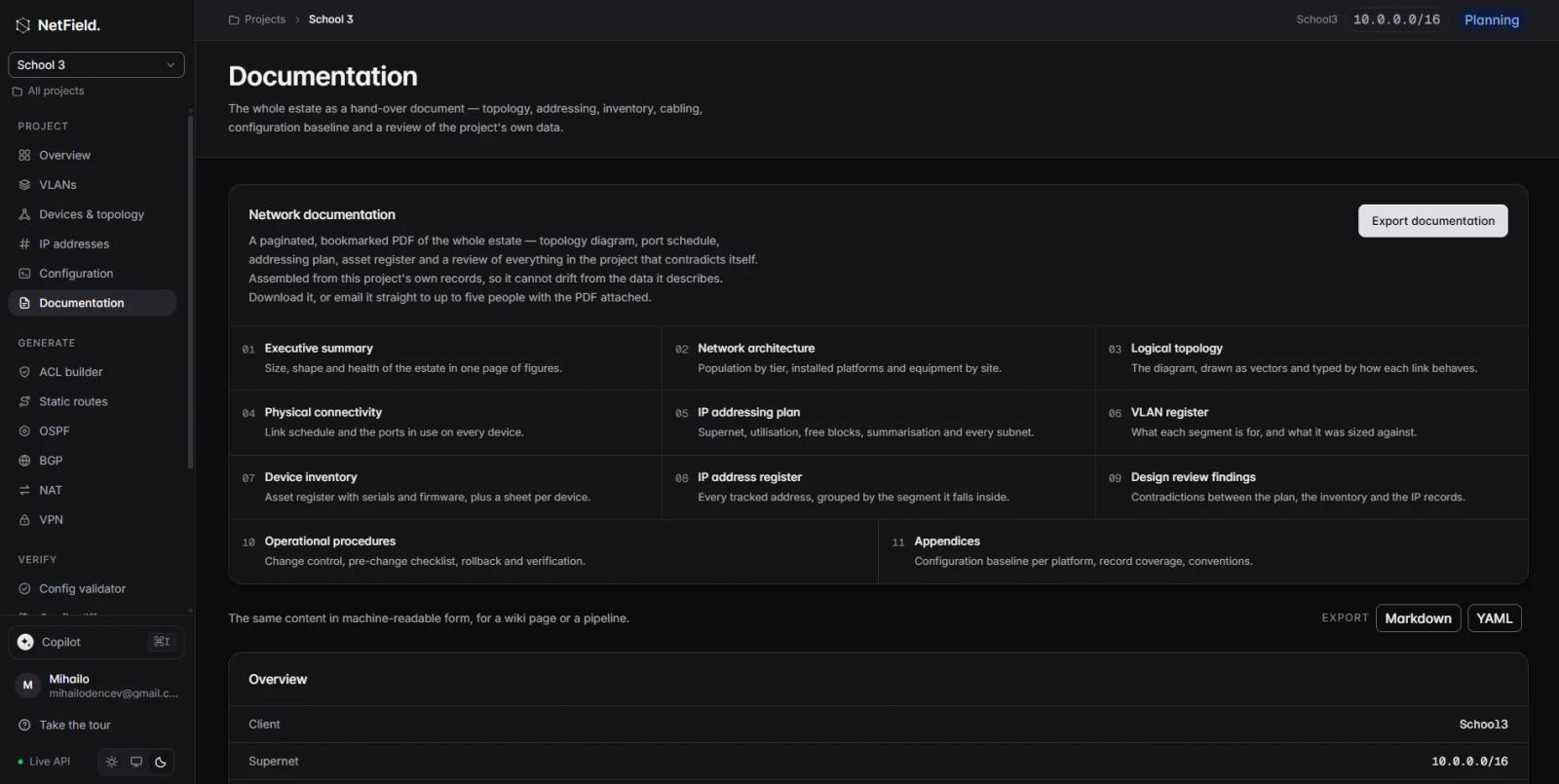
- Documentation: Keep project information organised and generate network documentation.
Whether you start with AI or build everything yourself, NetField helps you manage the network from initial design through configuration, validation, and documentation.
Conclusion
AI can make networking work more efficient by helping engineers troubleshoot problems, detect unusual behaviour, automate routine tasks, improve security investigations, analyse performance, and maintain documentation.
The most useful applications are those that solve a clear problem and fit into a controlled engineering workflow. AI-generated recommendations still need to be checked, sensitive information needs protection, and production changes require appropriate validation and oversight.
For network teams, the goal is not to use AI everywhere. It is to apply it where it makes the work faster, clearer, more consistent, and easier to manage.
NetField supports this direction by keeping network planning, addressing, devices, configuration, validation, and documentation connected, helping engineers maintain the structured project information on which effective network operations depend.
Frequently asked questions
What are the main benefits of AI in networking?
The main benefits include faster troubleshooting, anomaly detection, AI-assisted automation, improved security analysis, performance optimisation, easier access to technical knowledge, and more consistent documentation.
How does AI help network engineers troubleshoot problems?
AI can analyse logs, monitoring metrics, configuration changes, and related events to highlight patterns and suggest likely causes. Engineers still need to verify the findings against the actual network.
Can AI automate network configuration?
AI can help generate configuration drafts and interpret requirements. Automation tools can then apply approved changes to supported devices, provided the workflow includes suitable validation and controls.
Can AI improve network security?
Yes. AI can help identify unusual activity, correlate security signals, prioritise alerts, and support investigations. It cannot guarantee that every threat will be detected or that every alert is accurate.
Does AI replace network engineers?
No. AI can assist with analysis and repetitive work, but engineers remain responsible for network design, risk assessment, validation, change approval, and handling unexpected outcomes.
What is AIOps in networking?
AIOps refers to the use of AI and machine learning to analyse operational data, detect patterns, support root cause analysis, and recommend or automate actions. In networking, it is used to improve monitoring and network operations.
What is the difference between AI and network automation?
Traditional automation executes predefined rules and workflows. AI can help interpret requests, recognise patterns, generate suggestions, and support decisions. The two can work together, with AI assisting the process and controlled automation executing approved actions.
How can AI help with network documentation?
AI can summarise changes, explain configurations, draft incident reports, and turn structured project information into readable documentation. The output should be checked against authoritative network records before it is treated as final.